

Description
Download Congregation & Territory Manager – Bing Maps, Map Cards, Territory Reports
Overview
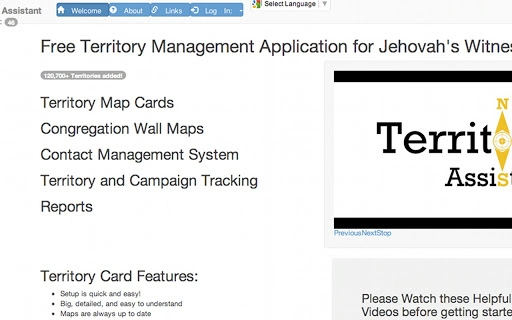
The Congregation & Territory Manager is a desktop application designed to streamline the creation and management of congregation and territory boundaries for religious organizations. By leveraging Bing Maps, the software enables users to quickly define road-based territories with an auto-map feature that generates boundaries in seconds. This tool is especially useful for those responsible for organizing field service activities, ensuring accurate and efficient territory planning. The application supports the export of high-quality Map Cards in multiple common formats, facilitating both digital and physical distribution. Users can create detailed Congregation Wall Maps, organizing territories by custom tags for enhanced clarity and usability. Additional functionality includes tracking of Do Not Contact (DNC) addresses and foreign language addresses, which helps maintain accurate outreach records. The tool also provides access to a JW Product search directly from the Links page, enhancing integration with existing workflows. While the developer did not provide additional background information, the software appears tailored to religious communities that require structured, map-based territory organization. Real-world usage scenarios include preparing for field service meetings, planning outreach campaigns, and generating reports for administrative review.
Key Features & Capabilities
- Bing Maps Integration: Utilizes Bing Maps as a base layer for accurate geographic representation, enabling users to draw and adjust boundaries with precision.
- Auto-Map Feature: Automatically generates road-based territory boundaries, reducing manual effort and minimizing errors in map creation.
- Map Card Export: Supports export of map cards in multiple standard formats, ensuring compatibility with various printing and digital sharing platforms.
- Congregation Wall Maps: Allows the creation of visually organized wall maps with territories arranged by user-defined tags for improved navigation and presentation.
- Territory Management: Offers tools to manage multiple territories, including updates, reassignments, and status tracking.
- DNC and Foreign Language Address Tracking: Enables users to mark and monitor addresses where contact is restricted or where language-specific outreach is required.
- Territory Reports: Generates informative reports for administrative review, helping leaders assess outreach efforts and territory coverage.
- JW Product Search: Provides direct access to a product search tool from the Links page, supporting integration with related resources.
These features collectively support efficient and organized field service planning. For example, a congregation leader can use the auto-map feature to quickly define new territories after a reorganization, then export Map Cards for distribution to volunteers. The tagging system allows for easy identification of areas with high foreign language populations, enabling targeted outreach. Reports can be generated to evaluate territory performance and identify gaps in coverage. The ability to track DNC addresses ensures compliance with contact policies, while the integration with the JW Product search enhances resource accessibility.
User Interface, Workflow & Performance
The application features a clean, intuitive interface designed to simplify the map-based workflow for users with varying levels of technical experience. Navigation is structured around core functions such as map editing, territory tagging, and report generation, allowing users to access tools without unnecessary complexity. The workflow follows a logical sequence: users begin by selecting a location on Bing Maps, define boundaries using the auto-map feature, assign tags, and then proceed to export or generate reports. The interface supports drag-and-drop functionality for map elements, improving ease of use. While exact performance details were not specified, the software’s lightweight nature—measuring just 12.4 MB—suggests efficient resource usage. The developer did not specify resource usage details, but the small file size implies minimal impact on system performance. Stability appears to be a priority, with no indication of crashes or errors in the provided information. General software behavior patterns suggest consistent operation across supported platforms, though real-world performance may vary based on individual system configurations.
Compatibility & System Requirements
The software is compatible with Windows, Mac, and Linux operating systems, offering broad accessibility across different computing environments. This multi-platform support allows users to install and run the application on their preferred device, whether using a PC, Mac, or Linux machine. The installation size is 12.4 MB, indicating a lightweight footprint that does not require significant disk space. The developer did not provide additional system requirements, so users should ensure their systems meet general desktop application standards. Exact system requirements were not listed, and compatibility information was partially provided. It is recommended to verify that the system has a stable internet connection, as Bing Maps integration requires online access for map rendering. Users should also ensure that their browser supports the necessary web technologies used by the application. While no specific hardware requirements were mentioned, the software is expected to function on standard modern desktops and laptops.
Pros and Cons
Pros
- Efficient auto-map feature for rapid territory boundary creation
- Supports multiple export formats for Map Cards
- Enables creation of detailed Congregation Wall Maps with custom tagging
- Tracks DNC and foreign language addresses for accurate outreach
- Includes built-in JW Product search via the Links page
- Lightweight at only 12.4 MB
- Available for Windows, Mac, and Linux
Cons
- Developer information not provided
- No specific system requirements listed
- Performance details not specified
- Offline functionality not confirmed
- Updates and version history not detailed
FAQ Section
Is the software compatible with all Windows versions?
The software is compatible with Windows, Mac, and Linux, but specific version compatibility was not provided. Users should ensure their system meets general desktop application requirements.
Is the software secure to download and use?
The software is available for free and does not require registration. While no security details were provided, it is recommended to download from official sources to minimize risks.
Does the software require an internet connection?
Yes, the application uses Bing Maps, which requires an active internet connection for map rendering and data access.
Can I use the software offline?
It is not confirmed whether the software supports offline functionality. The reliance on Bing Maps suggests online access is necessary for core features.
What types of reports can I generate?
The software allows users to generate territory reports that can be used for administrative review, outreach assessment, and coverage analysis.
Final Thoughts + CTA
The Congregation & Territory Manager offers a focused, practical solution for religious organizations seeking to organize and visualize their field service territories efficiently. Its integration with Bing Maps, combined with the auto-map feature, significantly reduces the time required to create accurate road-based boundaries. The ability to generate Map Cards, track DNC and foreign language addresses, and produce informative reports makes it a valuable tool for congregation leaders and administrators. While some details such as system requirements and update history are not available, the software’s lightweight design and multi-platform support enhance its accessibility. For users managing complex territory structures, this tool provides a streamlined workflow and visual clarity. Download Congregation & Territory Manager now to simplify your outreach planning and enhance your congregation’s field service organization.
Guides & Tutorials for Territory Assistant App for Chrome
How to install Territory Assistant App for Chrome
- Click the Preview / Download button above.
- Once redirected, accept the terms and click Install.
- Wait for the Territory Assistant App for Chrome download to finish on your device.
How to use Territory Assistant App for Chrome
This software is primarily used for its core features described above. Open the app after installation to explore its capabilities.
User Reviews for Territory Assistant App for Chrome 0
No reviews found





